


Philip✓ Verified buyer
22.10.2026
Schnell und zuverlässig geliefert
Schnell und zuverlässig geliefert. Alles wie erwartet. Top!


Tax included. Shipping from €3.90, free from €70.
Only 1 left in stock · order by 12:00 (CET) and it ships the same business day, delivery in 1–3 business days
What else you need
Good to know: Keyboard sizes and layoutsHot-swap keyboards
KBDFans · Tofu 3.0 design
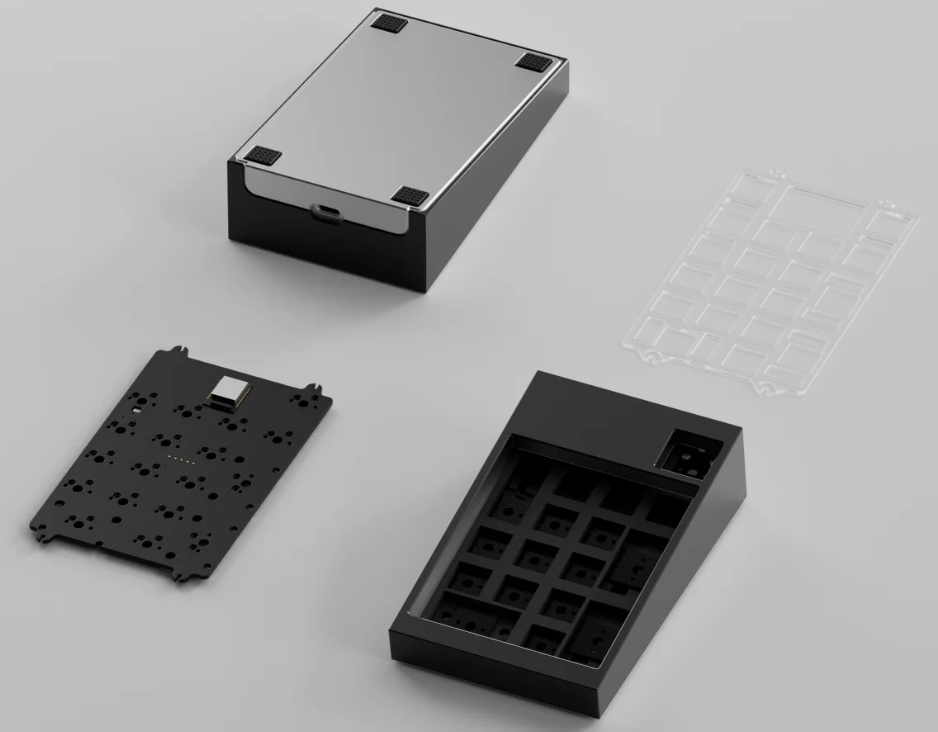
The design language of the Tofu60 3.0 and Tofu65 3.0 in a numpad: a two-tone aluminium case, two mounting options, a force-break system and a dual-mode PCB with Bluetooth. A companion for a 60%, 65% or TKL keyboard – or a macropad.

01 · Configurations
You only choose the colours of the top and bottom case. Everything else is the same for every variant: a copper-coloured aluminium internal weight, dual-mode hot-swap PCB, PC plate, foam kit and a battery.

02 · Case
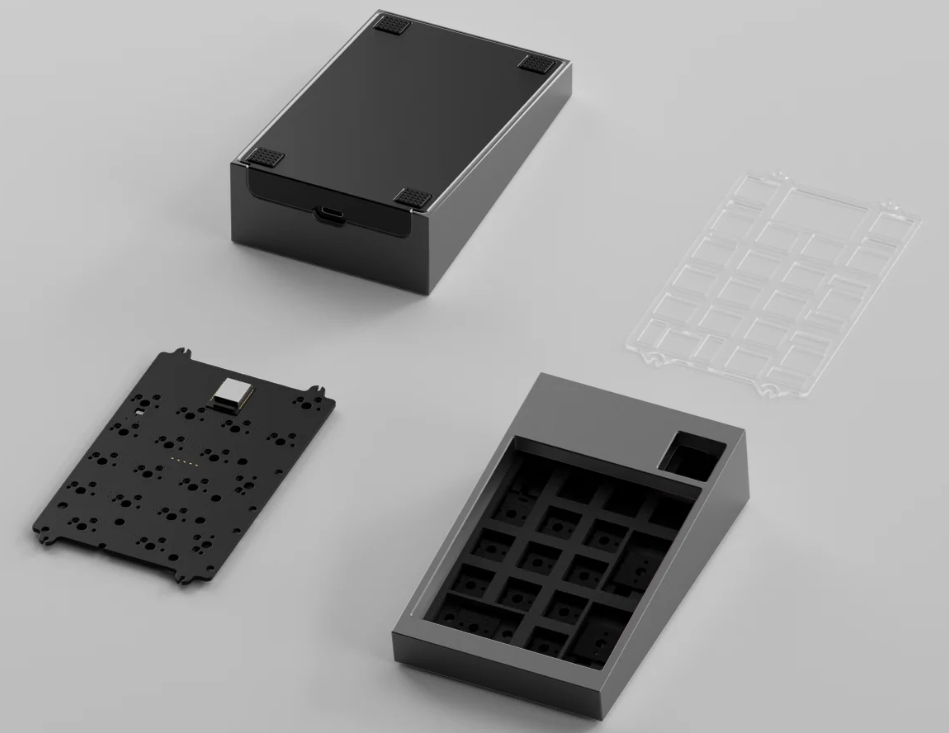
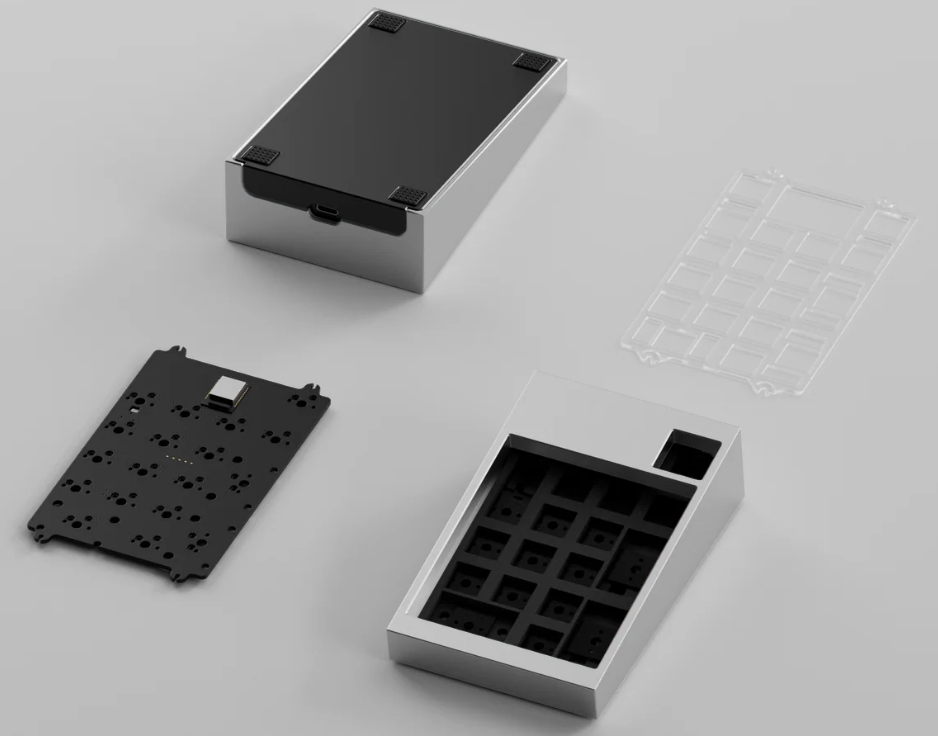
Top and bottom case are both aluminium. At the back, the bottom case rises as a visible accent and splits the area around the USB-C port into two sections – that's where the two-tone look of the bigger Tofu boards comes from.
The underside has a fine wave pattern. Inside sits a copper-coloured aluminium weight.

03 · Mount
Both mounting options are included – you can switch whenever you like.
Firm, direct bottom-out. The mounting points are placed to keep hollowness and resonance low; silicone dampeners separate the plate from the top case.
Support points distributed much like the top mount, but tuned for maximum softness – bouncy and flexible.

04 · Force break
Force-break pads sit between the two case halves. They decouple the top and bottom case so vibrations don't travel through the whole case – less resonance, no metallic ping.

05 · PCB
The TofuPad uses KBDFans' dual-mode hot-swap PCB with ZMK firmware. It connects via USB-C or Bluetooth, and the battery is included. Switches simply plug in and can be swapped without soldering. There is no 2.4 GHz wireless.
Out of the box a classic numeric keypad – for spreadsheets, accounting, CAD or as a companion to a keyboard without a numpad.
With ZMK Studio you remap keys, add layers and turn the TofuPad into a macropad for shortcuts in Photoshop, video editing or streaming.
06 · Plate
Every TofuPad comes with a polycarbonate plate. You can add an aluminium plate as an extra.
Softer and more flexible, with a muted, deeper sound.
Stiff and direct – firm bottom-out, brighter sound.
07 · Who is it for?
You own a Tofu keyboard and want the matching numpad in the same design language.
You type on 60%, 65% or TKL and only need a numpad now and then – or a fully remappable macropad with real switches.
A note on Tofu combinations
The TofuPad and TofuTKL come from separate production runs. In the same colour, shade and dimensions can differ slightly – that's normal for separate batches.
The TofuPad is a barebone kit: you'll need switches, keycaps and stabilisers – see our stabilisers. The aluminium plate is also available on its own in the TofuPad spare parts.
Schnell und zuverlässig geliefert
Schnell und zuverlässig geliefert. Alles wie erwartet. Top!
KBDFans never disappoint
There is nothing to complain about this product, excellent quality and finishing, easy to mount, and if KBDFans keep it in stock a good customizable numpad for anyone needing one.
KBDFans · Tofu 3.0 design
The design language of the Tofu60 3.0 and Tofu65 3.0 in a numpad: a two-tone aluminium case, two mounting options, a force-break system and a dual-mode PCB with Bluetooth. A companion for a 60%, 65% or TKL keyboard – or a macropad.
01 · Configurations
You only choose the colours of the top and bottom case. Everything else is the same for every variant: a copper-coloured aluminium internal weight, dual-mode hot-swap PCB, PC plate, foam kit and a battery.
02 · Case
Top and bottom case are both aluminium. At the back, the bottom case rises as a visible accent and splits the area around the USB-C port into two sections – that's where the two-tone look of the bigger Tofu boards comes from.
The underside has a fine wave pattern. Inside sits a copper-coloured aluminium weight.
03 · Mount
Both mounting options are included – you can switch whenever you like.
Firm, direct bottom-out. The mounting points are placed to keep hollowness and resonance low; silicone dampeners separate the plate from the top case.
Support points distributed much like the top mount, but tuned for maximum softness – bouncy and flexible.
04 · Force break
Force-break pads sit between the two case halves. They decouple the top and bottom case so vibrations don't travel through the whole case – less resonance, no metallic ping.
05 · PCB
The TofuPad uses KBDFans' dual-mode hot-swap PCB with ZMK firmware. It connects via USB-C or Bluetooth, and the battery is included. Switches simply plug in and can be swapped without soldering. There is no 2.4 GHz wireless.
Out of the box a classic numeric keypad – for spreadsheets, accounting, CAD or as a companion to a keyboard without a numpad.
With ZMK Studio you remap keys, add layers and turn the TofuPad into a macropad for shortcuts in Photoshop, video editing or streaming.
06 · Plate
Every TofuPad comes with a polycarbonate plate. You can add an aluminium plate as an extra.
Softer and more flexible, with a muted, deeper sound.
Stiff and direct – firm bottom-out, brighter sound.
07 · Who is it for?
You own a Tofu keyboard and want the matching numpad in the same design language.
You type on 60%, 65% or TKL and only need a numpad now and then – or a fully remappable macropad with real switches.
A note on Tofu combinations
The TofuPad and TofuTKL come from separate production runs. In the same colour, shade and dimensions can differ slightly – that's normal for separate batches.
The TofuPad is a barebone kit: you'll need switches, keycaps and stabilisers – see our stabilisers. The aluminium plate is also available on its own in the TofuPad spare parts.
Schnell und zuverlässig geliefert
Schnell und zuverlässig geliefert. Alles wie erwartet. Top!
KBDFans never disappoint
There is nothing to complain about this product, excellent quality and finishing, easy to mount, and if KBDFans keep it in stock a good customizable numpad for anyone needing one.



 1593


 97

